


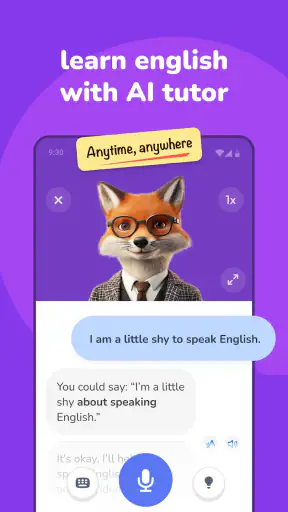
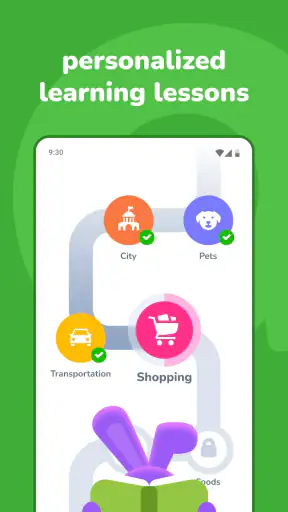

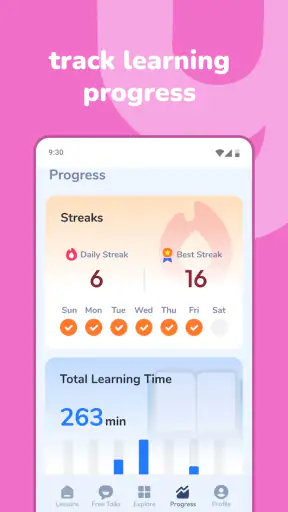
I found YayTalk: Speak & Learn English most useful when I treated it as a speaking partner rather than as a complete replacement for an English course. Its main idea is simple: use an AI tutor to practise English through conversation, then turn those exchanges into a repeatable daily habit. That makes it especially appealing if you understand more English than you feel comfortable speaking.
YayTalk is an education app from IdeaLabs, available free of charge with optional in-app purchases ranging from $9.99 to $59.99 per item. It is rated for Everyone, so its presentation is approachable for a broad audience, including learners who are just beginning to speak. The app’s current version is 1.2.33, and it runs on Android 7.0 or later.
How I built a useful daily workflow with YayTalk
My best results came from keeping the first session deliberately small. Instead of opening the app with the vague goal of “improving English,” I chose one practical situation: ordering food, introducing myself at work, asking for directions, or making small talk. A focused situation gives the conversation a purpose and makes it easier to notice what I actually struggle to say.
I would begin with a short exchange, answering naturally rather than trying to produce perfect sentences. This matters because many learners freeze when they compose every reply in their first language before translating it. With an AI tutor, I could use the conversation to practise reacting, asking a follow-up question, and recovering after a mistake. Those are the parts of real communication that flashcard-based study often leaves untouched.
One habit made the app more useful: I kept a tiny personal list after each practice session. I wrote down only a few expressions that I had needed or failed to produce, such as a polite way to disagree or a phrase for asking someone to repeat themselves. I then brought those expressions into the next conversation. This turned YayTalk from a series of disconnected chats into a gradual speaking routine.
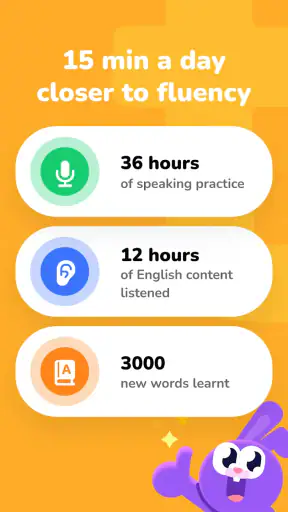
The app is also a good fit for short gaps in the day. A learner can practise during a commute, before an online meeting, or while waiting for an appointment without needing to prepare a full lesson. I would not expect a five-minute exchange to transform my English, but short sessions are easier to repeat than ambitious study plans. For speaking confidence, that consistency is more valuable than occasionally completing a long lesson and then disappearing for a week.
A realistic example is a learner preparing for a first conversation with an international colleague. I would start by asking the tutor to keep the topic around work introductions and everyday interests. After the first exchange, I would repeat the conversation with slightly different answers, then practise asking questions instead of only responding. On the third pass, I would deliberately avoid translating in my head. This workflow targets fluency, not just recognition.
That said, I would not use the app as my only source of English input. Conversation practice helps me form sentences, but reading, listening to varied speakers, and structured grammar study still matter. YayTalk works best as the active part of a wider routine: something that makes me speak, while other resources help me understand why a sentence works and expose me to different accents and styles.
Settings and preparation that make practice less frustrating
Before settling into regular use, I would check the app’s available conversation and learning settings rather than accepting every default. The most important choice is the level of challenge I can handle productively. If the interaction is too easy, I may answer automatically without expanding my vocabulary. If it is too difficult, I may spend the whole session decoding instead of speaking.
I prefer starting with familiar subjects and gradually increasing difficulty. A beginner can stay with introductions, shopping, family, and daily routines. An intermediate learner may get more value from explaining an opinion, describing a problem, or negotiating a change of plan. The point is not to choose the most advanced topic immediately; it is to create enough pressure to stretch without making every reply exhausting.
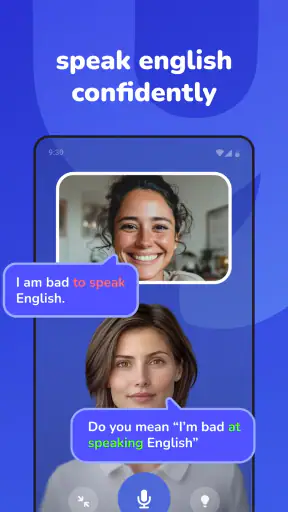
I would also pay attention to how corrections fit into the conversation. Constant interruption can damage confidence, while receiving no correction makes it hard to improve. When possible, I would separate fluency practice from accuracy review: first complete the exchange without stopping for every small error, then revisit the phrases that caused trouble. This is a useful trade-off for any AI language tutor, and it prevents correction from becoming the entire activity.
Another practical setting is the way I use the device itself. Speaking practice is much more effective when I can answer aloud instead of silently typing. I would choose a quiet enough place, keep the phone at a comfortable distance, and speak in complete thoughts. If the environment is noisy or I am embarrassed to talk, typing can still help with sentence building, but it does not provide the same rehearsal for real conversation.
I also recommend deciding what kind of feedback I want before beginning. Sometimes I need a natural reply so that the conversation keeps moving. At other times I want to focus on vocabulary, sentence structure, or a more natural alternative to something I said. Giving the session one main purpose keeps the exchange manageable. Trying to correct pronunciation, grammar, word choice, speed, and confidence simultaneously can make a short practice period feel like an exam.
Because the app is free to install but includes paid items, I would explore the basic experience first and decide whether it fits my learning style before spending money. The paid range is broad, from $9.99 to $59.99 per item, so I would look carefully at what each purchase unlocks and whether it supports the specific habit I want. A subscription or one-time purchase is only worthwhile if I am actually returning to practise.
Faster patterns for learners who already know the basics
Once I understood the basic workflow, I found that repeating the same type of conversation with small changes was more productive than constantly jumping between unrelated topics. For example, I could practise making a hotel request several times: first asking for information, then reporting a problem, then politely insisting on a solution. The vocabulary stays familiar while the communication goal changes.
This pattern exposes a common weakness: knowing individual words but not being able to connect them quickly. Repetition gives those connections more chances to become automatic. I would not repeat the exact same script word for word. Instead, I would keep the situation and vary the details, because real conversations rarely follow a memorised dialogue.
A second useful pattern is the “answer, extend, ask” cycle. I answer the tutor’s question, add one extra detail, and then ask a related question. If I am asked what I did at the weekend, I might answer, explain why I enjoyed it, and ask what the other person usually does. This prevents me from giving short replies and trains the habit of keeping a conversation alive.
I also like using intentional difficulty. After a comfortable session, I would choose a topic where my vocabulary is less secure, but I would not try to learn an entire specialist field at once. I might explain a simple opinion about technology, travel, or a workplace issue using ordinary language. When I cannot find an exact word, I practise describing it another way. That skill is extremely important in real conversations and is often more useful than memorising a long list of rare terms.
For learners preparing for travel or work, scenario rotation is especially effective. One day can focus on starting a conversation, the next on clarifying information, and another on handling a misunderstanding. These are different speaking skills even when they use similar vocabulary. I would keep the scenarios connected to a real upcoming need, because relevance makes it easier to remember the phrases later.
Another advanced habit is to leave a deliberate pause before answering. Many learners believe fluency means speaking without hesitation, but natural speakers also pause to organise thoughts. I would use the tutor conversation to practise short fillers and clarification phrases instead of going silent or switching languages immediately. The goal is not to eliminate every pause; it is to make pauses feel controlled.
YayTalk’s conversational format also makes it suitable for confidence training. I can rehearse an awkward situation privately before facing it in public. That could mean introducing myself to a new team, asking someone to slow down, or explaining that I did not understand a point. The app cannot reproduce every human reaction, but it can lower the emotional barrier to trying the first sentence.
Where the AI tutor helps, and where it reaches its limits
The biggest limitation is that an AI conversation is still a controlled practice environment. It can give me opportunities to respond, but it cannot guarantee that my future conversation partner will use the same vocabulary, speed, humour, or pronunciation. I would therefore treat successful practice as preparation, not proof that I am ready for every real-world exchange.
There is also a risk of becoming too comfortable with predictable interaction. If I always choose familiar topics and accept easy replies, I may feel fluent inside the app while remaining hesitant elsewhere. The solution is to increase variety deliberately: change the subject, explain an unfamiliar idea, ask for clarification, and practise responding when the conversation does not go exactly as expected.
AI feedback should be treated thoughtfully as well. A correction can be useful, but not every alternative sentence is necessarily the only natural choice. English has many acceptable ways to express the same idea, and context affects whether a phrase sounds formal, casual, direct, or awkward. I would use the app to generate possibilities, then compare them with trusted learning material or examples from real English when a distinction matters.
Privacy and comfort are practical considerations whenever speaking is involved. I would avoid practising sensitive personal information or confidential workplace details. Even when a scenario is imaginary, it is easy to include more personal context than necessary. Keeping practice topics general makes the habit safer and also keeps the focus on language rather than on explaining private circumstances.
The app may not be the right choice for someone who wants a fixed, teacher-led syllabus with explicit progression through grammar units. A traditional course can be better for learners who need systematic explanations, homework, tests, and human assessment. Likewise, a live tutor is the stronger option when the priority is nuanced pronunciation feedback, cultural guidance, or spontaneous interaction with a real person.
It may also be a poor fit for a learner who dislikes speaking to technology or who expects instant mastery from casual use. The AI format removes some social pressure, but it still requires active participation. If I only read suggested replies or type the shortest possible answers, I lose much of the benefit. The app rewards willingness to experiment more than passive browsing.
Compared with flashcard apps, YayTalk is stronger for retrieval in context and conversational confidence, but weaker for quick vocabulary drilling. Compared with grammar platforms, it gives more room to use language spontaneously, but less emphasis on carefully sequenced explanations. Compared with live conversation exchanges, it is more convenient and less intimidating, though it cannot provide the unpredictability and human nuance of another person.
Who should use it and how to judge progress
I would recommend YayTalk to learners who already know some basic English but avoid speaking because they fear mistakes. It is also useful for people who need practice around a particular situation, such as travel, customer conversations, workplace introductions, or everyday small talk. Beginners can benefit too, provided they keep topics simple and do not expect the AI tutor to replace foundational instruction.
The app has attracted a 4.7 average from around 9.8 thousand ratings and has passed one million installs, which suggests that its conversational approach has reached a substantial audience. Those figures do not decide whether it suits me, but they make it reasonable to test as part of a speaking routine. I would judge it by whether I return to it and whether real conversations become less effortful.
Progress is easier to notice when I track behaviour rather than vague feelings. I would ask myself whether I can answer more quickly, keep a conversation going for longer, ask better follow-up questions, and recover when I forget a word. I would also revisit an old scenario after some time and compare how naturally I handle it. These signs are more meaningful than simply completing many sessions.
The app’s Everyone age rating makes it approachable for families and younger learners, but I would still adapt the topics and supervise younger users according to their individual needs. An AI tutor can encourage practice, yet it does not replace a parent, teacher, or structured educational plan when a learner needs close guidance.
IdeaLabs has positioned this as an accessible education app rather than a specialist examination platform, and that distinction matters. If my goal is a narrowly defined test score, I would pair it with exam-specific reading, listening, and writing practice. If my goal is to stop translating every sentence and become more willing to speak, its conversational focus is much more relevant.
My verdict after turning conversation into a habit
I like YayTalk because it addresses the part of English learning many people postpone: actually forming replies. Its strongest quality is not that it makes language learning effortless, but that it gives me a low-pressure place to practise repeatedly. With a clear scenario, a realistic difficulty level, and a short review after each exchange, the app can become a practical speaking tool rather than another unused study download.
I would keep expectations balanced. It cannot provide the full range of accents, emotions, corrections, and cultural context found in human conversation. It also should not be the only resource for grammar, listening, or formal writing. The optional purchases deserve a careful look before payment, especially for casual learners who have not yet established a regular routine.
For me, the best approach is simple: choose one real-life situation, speak in complete answers, extend the conversation, review a few useful phrases, and return to the same situation with new details. That repeatable method makes the AI tutor more valuable over time. If your main obstacle is speaking confidence, YayTalk is worth trying; if you need a complete, teacher-led curriculum, use it alongside something more structured rather than relying on it alone.


